
Form IT-2104, the Employee’s Withholding Allowance Certificate, is what New York employees give their employer to set state, NYC, and Yonkers tax withholding. It only affects paycheck withholding, not your final tax bill.
That withholding role matters because the 2026 form reflects revised state rate schedules and a $500 penalty for false claims that lower it.
Even so, getting allowances wrong can mean owing tax and interest later.
Form IT-2104 at a Glance: What You Need to Know First
Form IT-2104 sets how much state, city, and Yonkers tax comes out of each paycheck. For the full breakdown of everything withheld, see what taxes come out of a New York paycheck. It does not set your final tax, which is settled when you file.
What Is Form IT-2104?
Payroll uses your residency, marital status, and allowances to figure the withholding amount, then sends it to the New York State Tax Department on your behalf. Your final tax is settled on your return, so withholding is only a prepayment.
Who Needs to Complete Form IT-2104?
Every new employee should complete one. File a new form if your life, income, job, or tax situation changed, and review it once a year either way. If you have two jobs, claim all your allowances at the higher-paying job and zero at the other, so withholding better matches your real tax.
Does Everyone Need to Fill Out IT-2104?
Almost every employee should. Federal Form W-4 dropped allowances in 2020, so New York needs its own form. Skip it, and your employer may use zero allowances for you. A few workers need a different form, such as IT-2104-E for exemption.
2026 IT-2104 Changes You Should Know Before Filling It Out
The 2026 form has revised instructions, and New York changed its rate schedules for 2026. If you used the worksheet or charts on a form filed before January 1, 2026, file a new one.
What Changed on the 2026 Form IT-2104?
The Tax Department revised the IT-2104 instructions for tax years starting on or after January 1, 2026, and the updated instructions went live in December 2025. The New York State Department of Taxation and Finance published the 2026 IT-2104 instructions with the current worksheet and charts. The form still asks for the same basics, but the math behind the worksheet and charts now reflects the 2026 rate schedules.
What Changed in New York Withholding for 2026?
New York State revised its income tax rate schedules for payrolls on or after January 1, 2026, under Chapter 59 of the Laws of 2025. Yonkers withholding tables changed too. New York City tables did not. Employers now use the January 2026 publications NYS-50-T-NYS, NYS-50-T-NYC, and NYS-50-T-Y. For the full 2026 rate breakdown, see our New York State income tax hub.
Should You Replace an Older IT-2104 With a 2026 Version?
Yes, if you filed before January 1, 2026 and used the worksheet or the additional-withholding charts, since those numbers are outdated. Also file a new form whenever your life or income changes.
IT-2104 vs W-4 vs Other New York Withholding Forms
IT-2104 handles New York withholding. Federal Form W-4 handles federal withholding. Most workers need both, plus IT-2104-E or IT-2104.1 in a few cases.
IT-2104 vs Federal Form W-4
Federal Form W-4 sets federal withholding. IT-2104 sets New York State, NYC, and Yonkers withholding. Since 2020, the W-4 has no allowances, so sending only that may leave your employer using zero for New York. See the IRS’s current Form W-4, or our New York W-4 vs IT-2104 guide for a full side by side comparison. If you last filed a W-4 for 2019 or earlier and the IRS later disallows some of those allowances, file a new IT-2104 too. Neither form replaces the other.
IT-2104 vs IT-2104-E
IT-2104 sets how much tax is withheld. IT-2104-E, the Certificate of Exemption from Withholding, asks for none. The test is no New York tax last year, none expected this year, and being under 18, over 65, or a full-time student under 25. It expires every April 30, so refile it each qualifying year, and switch back to IT-2104 if your income will top $3,100. Do not use it just to raise take-home pay.
IT-2104 vs IT-2104.1
IT-2104.1, officially the New York State, City of New York, and City of Yonkers Certificate of Nonresidence and Allocation of Withholding Tax, is for people who do not live in New York State, NYC, or Yonkers. It helps your employer allocate withholding by work location instead of allowances. See our full IT-2104.1 walkthrough for how the allocation percentage works.
Which New York Withholding Form Do You Need?
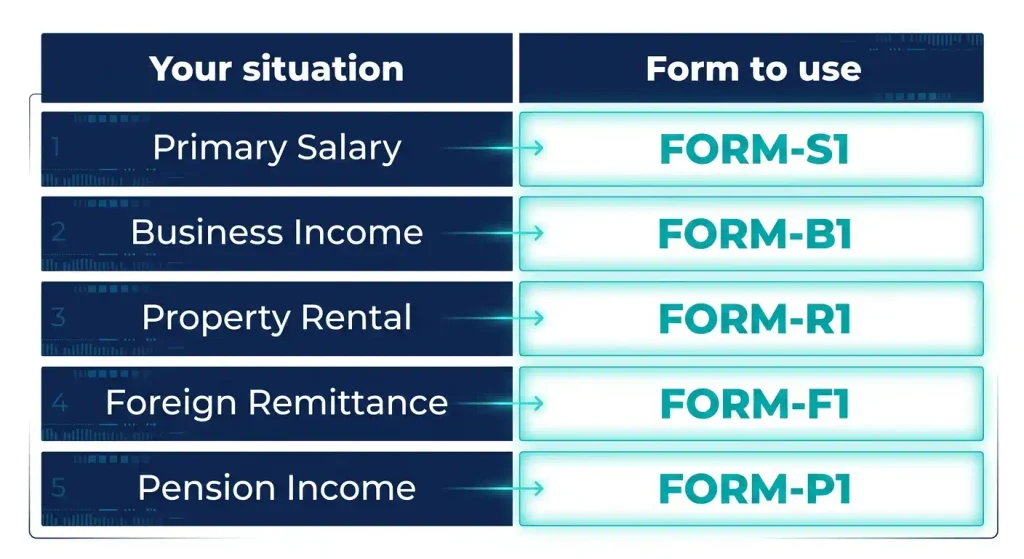
| Your situation | Form to use |
|---|---|
| Regular employee who lives in New York | IT-2104 |
| Qualify for no New York tax withheld | IT-2104-E |
| Live outside NYS, NYC, or Yonkers | IT-2104.1 |
| Qualify for the Native American exemption | IT-2104-IND |
| Military service personnel with an exemption | IT-2104-MS |
Unusual case? Check that form’s own instructions, or browse our full New York tax forms and withholding hub for every related form.
Before You Fill Out IT-2104: Gather These Details
Grab your address, filing status, income estimate, and pay details first.
Personal Information You Need
You need your name, home address, and Social Security number. Your permanent home address decides whether NYC or Yonkers tax applies, so use it, along with your filing status.
Tax Information You May Need
Estimate your 2026 wages, plus a spouse’s wages if married. Count dependents and expected credits. Check last year’s return too, since owing tax or a big refund is a signal to adjust.
Know Your Payroll Situation
Know your job count and pay frequency, since chart amounts are weekly and need adjusting otherwise. Check if your spouse works. Ask HR if your employer joined the Employer Compensation Expense Program (ECEP), since Part 3 of the worksheet turns that into an allowance.
How to Fill Out Form IT-2104 Step by Step
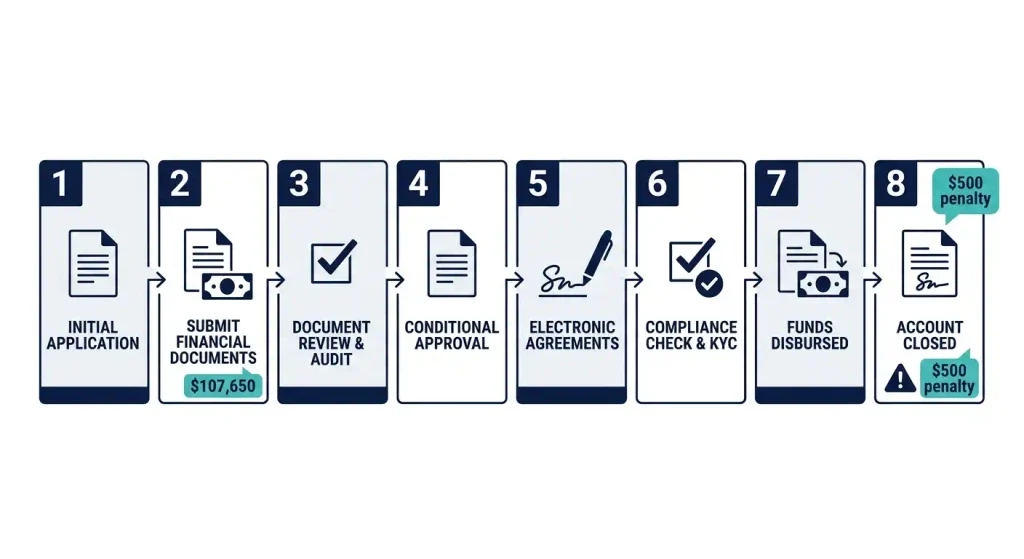
Eight steps: your details, filing status, two residency questions, allowances, extra withholding if needed, and your signature.
Step 1: Enter Your Personal Information
Write your name, Social Security number, and permanent home address. Use the address where you actually live, matching your employer’s records.
Step 2: Choose Your Filing Status
Mark Single or Head of household, or Married. Choose “Married, but withhold at higher single rate” if both spouses work and combined wages stay under $107,650. Legally separated counts as a life change worth reviewing.
Step 3: Answer the New York City Residency Question
Answer yes if you live in the five boroughs: Manhattan, Brooklyn, Queens, the Bronx, or Staten Island. Residence decides this, not your office. NYC residents get city tax withheld on top of state tax.
Step 4: Answer the Yonkers Residency Question
Answer yes if you live in Yonkers. Working there does not count. Yonkers residents pay a surcharge on top of state tax.
Step 5: Enter New York State and Yonkers Allowances
Line 1 holds your NYS and Yonkers allowances. Enter zero if nothing applies, or use Part 1 of the worksheet and enter the line 19 total. You cannot claim an allowance for yourself or your spouse. Claim more than 14 allowances, and your employer, not you, must send a copy to the Tax Department.
Step 6: Enter New York City Allowances
Line 2 is for NYC allowances. Use Part 4 of the worksheet and enter the line 31 total, or zero if nothing applies.
Step 7: Add Extra Withholding if Needed
Lines 3, 4, and 5 add extra tax per pay period for New York State, NYC, and Yonkers. The instructions give weekly amounts, so double them for biweekly pay.
Step 8: Sign, Date, Submit, and Keep a Copy
Sign and date to certify your answers, then give the form to your employer, not the Tax Department. Keep a copy for yourself. A false statement that lowers your withholding can carry a $500 penalty, plus possible criminal penalties.
How to Calculate Your IT-2104 Allowances
Allowances lower withholding. Start at zero and add only what the worksheet gives you.
When Can a Single Taxpayer Enter Zero Allowances?
Single, one job, no dependents, no credits or deductions means you can skip the worksheet and enter zero. One catch: NYC residents still get 2 allowances on line 1 for the NYC school tax credit.
When Should You Use the IT-2104 Worksheet?
Use it if you are married, file head of household, have dependents, or expect credits or deductions. Each item adds allowances and lowers withholding.
How Dependents Affect Your Allowances
Each dependent on your state return adds one allowance on line 6. Head of household with one job adds 2 more on line 15. Recount after a birth or when a child stops qualifying.
How Tax Credits and Deductions Can Affect Allowances
The worksheet counts credits like this:
- 1 allowance each: college tuition, household, and real property tax credits
- 2 allowances, line 1 only: NYC school tax credit for NYC residents
- 3 allowances each: child and dependent care, earned income, and Empire State child credits
- Itemizers: use Part 2 of the worksheet to subtract your standard deduction from expected itemized deductions, then divide by $1,000
| Filing status | Standard deduction |
|---|---|
| Single (not a dependent) | $8,000 |
| Single (claimed as a dependent) | $3,100 |
| Head of household | $11,200 |
| Married filing jointly, or qualifying surviving spouse | $16,050 |
| Married filing separately | $8,000 |
Other credits use a divisor chart based on your New York adjusted gross income, or NYAGI, with the result on line 14.
| NYAGI (Single) | NYAGI (Married) | Divide credit by |
|---|---|---|
| Under $215,400 | Under $323,200 | 59 |
| $215,400 to $1,077,550 | $323,200 to $2,155,350 | 68 |
| $1,077,550 to $5,000,000 | $2,155,350 to $5,000,000 | 96 |
| $5,000,000 to $25,000,000 | $5,000,000 to $25,000,000 | 100 |
| Over $25,000,000 | Over $25,000,000 | 110 |
What If Your Calculation Produces Negative Allowances?
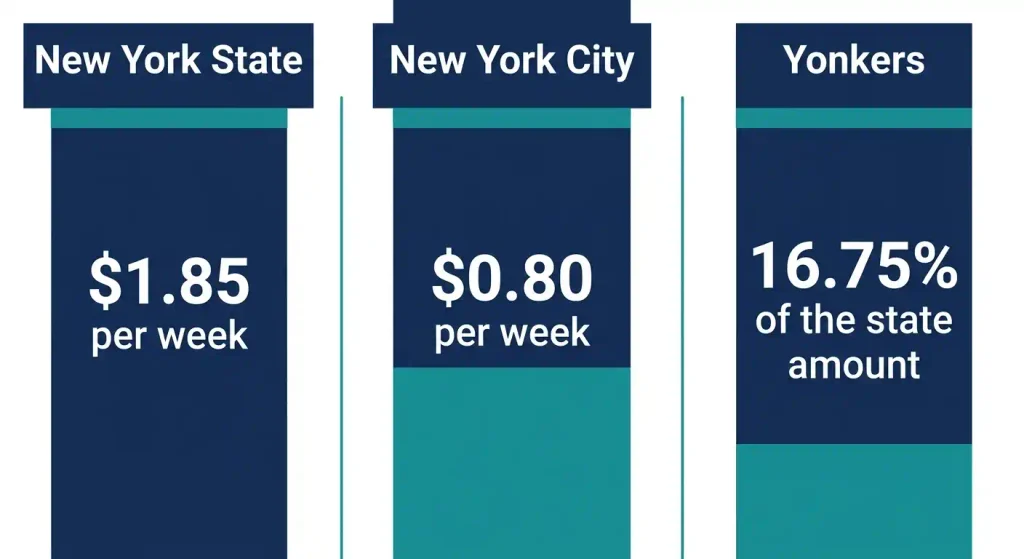
If your employer cannot use negative allowances, enter 0 and add extra withholding per negative allowance instead: $1.85 a week for New York State, $0.80 a week for NYC, and 16.75% of the state amount for Yonkers residents (see the per-pay-period table below).
Special 2026 Situations That Can Change Your IT-2104
Two jobs, a working spouse, or income at $107,650 or more changes the math, sometimes needing the Part 5 or Part 6 charts too.
You Have More Than One Job
Each employer only sees its own pay, so file a separate IT-2104 with each and claim all allowances at the higher-paying job. At combined wages of $107,650 or more, add the chart amount for your filing status on line 3.
You Are Married and Both Spouses Work
Each spouse files their own IT-2104. The higher earner claims the allowances, the lower earner claims zero. Under $107,650 combined, both mark “Married, but withhold at higher single rate.” At $107,650 or more, use the Part 5 charts on line 3.
You Expect to Earn $107,650 or More
This is the trigger point in 2026. With two jobs, single and head of household workers under this line cut seven allowances at the higher-paying job. At or above it, use the Part 5 or Part 6 chart.
You Have Self-Employment or Other Nonwage Income
Earning more than $1,000 outside your paycheck with no estimated tax paid means cutting one allowance per $1,000, whether from freelance work, interest, dividends, or alimony. Bigger amounts may call for Form IT-2105 and its IT-2105-I instructions instead.
You Itemize Deductions or Expect New York Tax Credits
A zero-allowance plan assumes the standard deduction and no credits. Itemizing or expecting credits, such as the college tuition, household, real property tax, child and dependent care, earned income, or Empire State child credits, adds allowances through the worksheet.
You Live Outside NYC or Yonkers but Work There
Your home decides city tax, not your office. You may still owe New York State tax on wages earned here, and Form IT-2104.1 helps allocate withholding.
2026 IT-2104 Examples for Common Employee Situations
Six examples using 2026 worksheet and chart numbers to illustrate the math. Run your own numbers, since these will differ.
Example 1: Single Employee, One Job, No Dependents
Sam is single, works one job, and lives outside NYC. Sam marks Single, answers no to both residency questions, and enters 0 on line 1.
Example 2: Married Employee With a Working Spouse
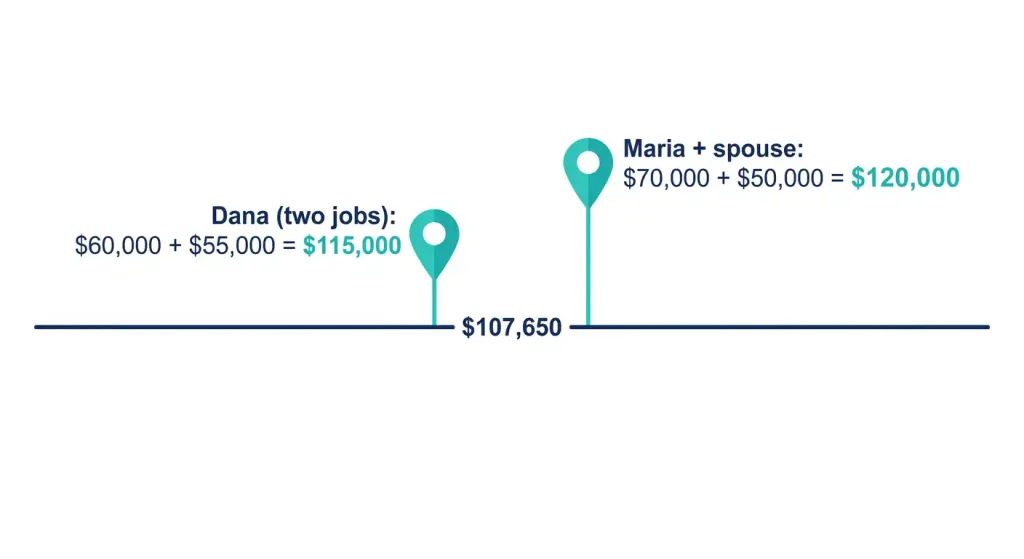
Maria earns $70,000 and her husband earns $50,000, for $120,000 combined, above $107,650. As the higher earner, Maria’s Part 5 chart row ($53,800 to $75,299) and column ($107,650 to $129,249) show $11 a week, or $22 biweekly on line 3.
Example 3: NYC Employee Starting a New Job
Priya moves into Queens and starts a new job. She answers yes to the NYC question. With no dependents or credits, the NYC school tax credit still adds 2 allowances on line 1. That credit only counts toward line 1, so line 2 stays 0.
Example 4: Employee Moving Into NYC or Yonkers
Jordan moves from Albany to Yonkers. The old form says no Yonkers residency, so Jordan updates that answer to yes and rechecks line 1, since Yonkers allowances share it with New York State.
Example 5: Employee With a Second Job
Dana is single with two jobs paying $60,000 and $55,000, for $115,000 combined. The Part 6 chart row ($53,800 to $75,299) and column ($107,650 to $129,249) show $12 a week, or $24 biweekly, on line 3 at the higher-paying job.
Example 6: Employee With Other Income
Chris earns $4,000 freelancing with no estimated payments, four negative allowances. Chris enters 0 on line 1 and adds $7.40 a week on line 3, or $14.80 biweekly.
How Much Should You Have Withheld From Each Paycheck?
Allowances move withholding up or down, alongside other paycheck deductions covered in our New York paycheck deductions guide. Your final tax bill only settles when you file.
How IT-2104 Allowances Affect Your Paycheck
More allowances mean less tax withheld now. Fewer mean more.
How Additional Withholding Works Per Pay Period
The instructions give these weekly amounts per negative allowance, doubled for biweekly pay:
| Jurisdiction | Additional withholding per week |
|---|---|
| New York State (line 3) | $1.85 |
| New York City (line 4) | $0.80 |
| Yonkers (line 5) | 16.75% of the state amount |
What Happens If Too Little Tax Is Withheld?
You may owe tax, interest, and possible penalties when you file. A balance due last year, a second job, or new side income are signs to adjust.
What Happens If Too Much Tax Is Withheld?
Too much withholding becomes a refund, your own money coming back, while shrinking every paycheck along the way. A large refund is a good reason to file a new IT-2104.
When Should You Update Form IT-2104?
Update it when your job, family, income, address, or tax result changes. Review it once a year regardless.
Update IT-2104 After a New Job or Job Change
File a new IT-2104 on day one of any job, and review it again if you add or end another. Employers can also ask you to file a new one anytime your allowances no longer fit your pay.
Update IT-2104 After Major Life Changes
Marriage, divorce or legal separation, a new child, or no longer being someone’s dependent are all listed reasons to file again.
Update IT-2104 After Income Changes
A raise or a spouse’s raise that crosses $107,650, new self-employment or other income, or a big drop in income can all leave your old numbers wrong. If the IRS tells you that you’re entitled to fewer allowances than you claimed on an old federal W-4, file a new IT-2104 too.
Update IT-2104 After a Residency Change
Moving into or out of NYC or Yonkers changes which local taxes apply, so update your residency answers and allowances right away.
Update IT-2104 After Filing Your Tax Return
Owing tax or getting a large refund is the clearest signal to rerun the worksheet with this year’s numbers.
Common IT-2104 Mistakes and Misconceptions
Six mistakes, quickly corrected.
“My Federal W-4 Replaces IT-2104”
It does not. Current W-4 versions carry no allowances, so sending only a W-4 may leave your employer using zero for New York, often meaning more tax withheld than needed.
“More Allowances Means I Pay Less New York Tax”
Allowances only change withholding, not your actual tax, which is set on your return. Claim too many and you may owe at filing, plus interest.
“IT-2104 Is Filed With My Tax Return”
It goes to your employer, not with your income tax return. Your employer keeps it on file, and you should keep your own copy too.
“IT-2104-E Is Just Another Version of IT-2104”
It is not. IT-2104-E asks for no withholding and only certain workers qualify. Claiming exemption just to raise take-home pay can leave you owing tax, interest, and penalties.
“Working in NYC Makes Me a NYC Resident”
Residence decides NYC tax, not your office. A commuter from outside the city answers no to the NYC question, though New York State tax on New York wages may still apply.
“The Same Allowances Work for Every Job”
Allowances belong to you, not each job. Claim your total once, at the higher-paying job, and factor in your spouse’s income.
What to Do After You Submit IT-2104
Check the next paycheck to confirm payroll applied your form.
Check Your First Paycheck
Compare the New York State line on your pay stub, and the NYC or Yonkers line if applicable, with what you expected.
Keep Your Copy and Review It Annually
Keep your signed copy on file, and review it once a year plus after any life or income event, since an old form can withhold the wrong amount.
What to Do If Payroll Uses the Wrong Withholding
Confirm what you submitted, ask payroll to review the record, submit a corrected IT-2104 if needed, and watch the next few paychecks for the change.
2026 IT-2104 FAQ
Quick answers to the most common questions.
What Is Form IT-2104 Used For?
It tells your employer how much New York State, NYC, and Yonkers tax to withhold. You give it to your employer, and it sets withholding, not your final tax.
Do I Need an IT-2104 If I Already Filled Out a W-4?
Yes. The W-4 covers federal tax only and has carried no allowances since 2020. Skip IT-2104, and your employer may use zero for New York.
How Many Allowances Should I Claim on IT-2104?
It depends. A single worker with one job and nothing to count often claims zero. Everyone else should use the worksheet, and multiple jobs or a working spouse may need the charts too.
Should I Claim Zero Allowances on IT-2104?
Zero fits a simple case: single, one job, no dependents, no credits. It means the most withholding, but it does not fit married workers, parents, or NYC residents.
Does IT-2104 Affect My Take-Home Pay?
Yes. More allowances mean bigger paychecks, extra withholding shrinks them, and your final tax only changes when you pay it.
Do I Need a New IT-2104 Every Year?
Review it every year, and file a new one when your situation changes. The 2026 form and instructions were revised, so anyone who used the worksheet or charts before January 1, 2026 should refile.
Where Do I Send Form IT-2104?
To your employer, not the Tax Department. Your employer sends a copy to the state only in special cases, such as claiming more than 14 allowances. Keep your own copy.
What Is the Difference Between IT-2104 and IT-2104-E?
IT-2104 sets how much is withheld. IT-2104-E asks for none, and only workers who meet the exemption rules can use it.
What If I Have More Than One Job?
File a separate IT-2104 with each employer, with all allowances on the higher-paying job. At $107,650 combined wages, add the chart amount on line 3, or cut seven allowances if you are single or head of household under that line.
What If I Live Outside New York City but Work in NYC?
Answer no to the NYC question, since residence drives the tax, not your office. Form IT-2104.1 may help if you live outside the state.
Official 2026 IT-2104 Resources and Forms
Three official places to check.
2026 Form IT-2104 and IT-2104-I Instructions
The Tax Department posts the 2026 IT-2104-I instructions with the worksheet and charts, plus a printable PDF. Use the current-year version, since older worksheets use older numbers.
2026 New York Withholding Tables
Employers use three January 2026 publications: NYS-50-T-NYS for New York State, NYS-50-T-NYC for New York City, and NYS-50-T-Y for Yonkers. The Tax Department’s withholding tax rate changes page explains what moved for 2026.
Related New York Withholding Forms
IT-2104-E is the certificate of exemption from withholding. IT-2104.1 covers nonresidents and allocation of withholding. IT-2104-IND, the New York State Certificate of Exemption from Withholding, and IT-2104-MS, the New York State Withholding Exemption Certificate for Military Service Personnel, cover exemptions for eligible Native Americans and military service personnel.
Final IT-2104 Completion Checklist
A quick check before and after you submit.
Before You Submit
- Name, Social Security number, and address are correct
- Filing status and NYC and Yonkers answers match where you live
- Allowance total comes from the worksheet, or zero if nothing applies
- Extra withholding on lines 3 to 5 matches your pay schedule
After You Submit
- Give the signed form to your employer
- Keep a copy for your own records
- Check the New York lines on your next paycheck
- Revisit the form after any major tax or life change

Meet Yasin Ali, Founder
Yasin built NY Paycheck Calculator in 2020 after getting fed up with calculators that treated New York like every other state. Most tools ignore the extra local tax NYC and Yonkers workers pay on top of state tax — or skip New York’s Paid Family Leave deduction entirely.
He keeps the numbers current, checking in regularly against the latest IRS, NY Department of Taxation and Finance, and Paid Family Leave rates.
All results here are estimates based on official sources. For advice specific to your situation, talk to a tax professional.